

Jigsaw puzzles for travel: 150+ puzzles offline on your tablet
On the plane, in a holiday cottage without Wi-Fi or on a beach with no signal: with Joinova Premium you download more than 150 pictures before you leave and puzzle them offline, with up to 1,500 pieces and no ads. A weekly challenge you’ve started can be finished with no signal.
Get it on Google PlayFree on Google Play, for Android phones and tablets. Premium is a one-time purchase, no subscription.
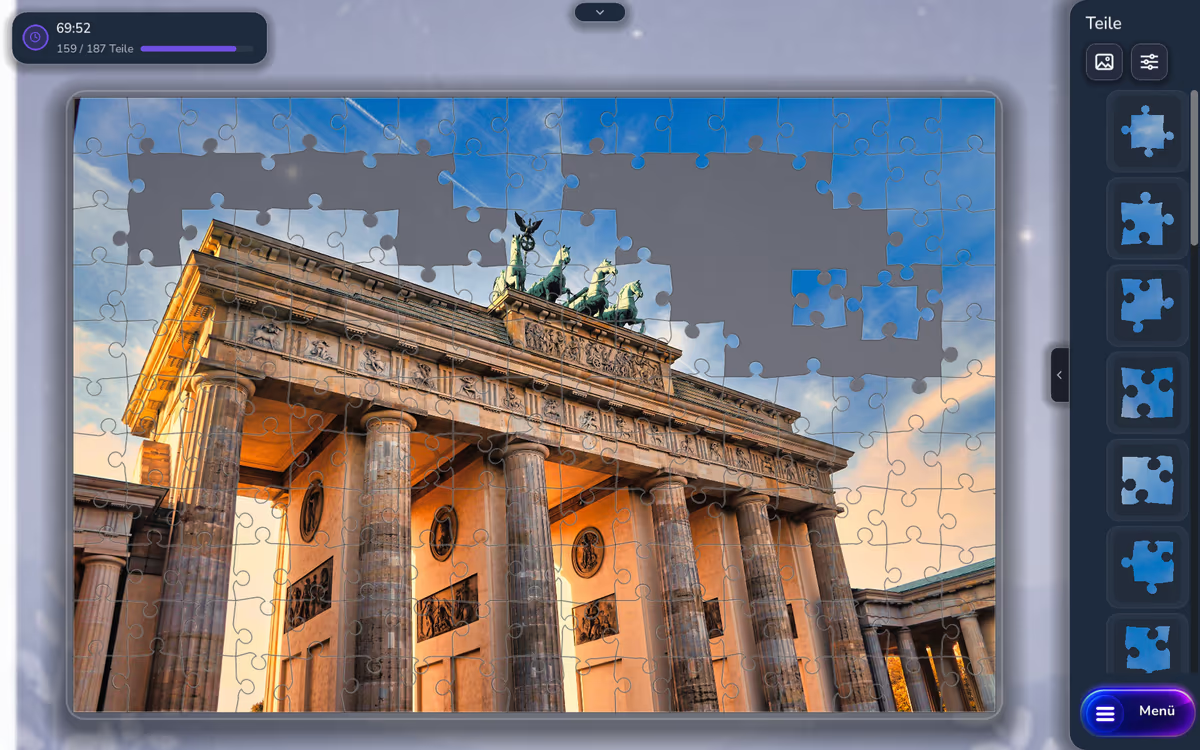
150+ puzzles in your bag, and not a single box
With Premium you can download every picture to your device in advance. Before your trip, go to Settings, open Storage and set image downloads to load all pictures on Wi-Fi. Then leave the app open on Wi-Fi until everything has downloaded. After that, you start new puzzles in flight mode just like at home.
There are more than 150 pictures already, and the library keeps growing: nature and landscapes, sea and underwater life, cities and landmarks, animals and wildlife, birds and insects, flowers and plants, vehicles and technology, art and patterns, fantasy. You can have up to 10 unsolved puzzles open at once and switch between them.
Already on the road and offline? Then the picture selection shows you a link to preload pictures. It takes you straight to that setting, ready for the next Wi-Fi.
Up to 1,500 pieces on a tablet
Before each puzzle you choose how many pieces it has: from 25, up to 300 on a phone and up to 1,500 on a tablet. 50 pieces fill the wait at the gate; 1,500 pieces fill a rainy day of your holiday.
Joinova saves after every piece you place. When boarding is called, just close the cover and tap “Continue” later. To stop the board from shifting on your lap or on the train, use “Lock board”. And just like at the table, a filter shows only the edge pieces.
Weekly challenge: start online, finish offline
Every calendar week everyone puzzles the same 100-piece picture; time and hints decide the score. To start the challenge you need internet: Joinova registers your run with the server and loads the picture of the week. After that you can keep puzzling offline, with or without Premium.
Your result counts for the week you played in. You can pause the challenge whenever you like, for example start on Monday, continue on Wednesday and finish on Saturday, even offline. It just has to reach the server within two days after the week ends (by Wednesday, 00:00 UTC). So if you finish offline while travelling, go online briefly afterwards; the Wi-Fi at your hotel or a café is enough.
If you start the challenge without internet, it can only be played locally: Joinova saves the run, but it doesn't get a place on the leaderboard.

Without Premium: your started puzzles come along
Without Premium you can keep playing the puzzles you've started offline too. Joinova keeps the pictures of your open puzzles on your device for that. Without Premium you can have at most 2 unsolved puzzles open at once, online or offline; finished puzzles don't count. Downloading every picture in advance is a Premium feature.
Our tip: start two big puzzles before you leave, say 1,000 pieces each on a tablet. They'll keep you busy for a while. A weekly challenge you've started counts towards the 2 open puzzles.
No ads, no subscription
With Joinova Premium you puzzle ad-free, with plenty of hints and no videos. It's a one-time purchase: $4.99 in the US (plus sales tax where it applies), £3.99 in the UK; Google Play shows you the price for your country. It's not a subscription, there's nothing to cancel, and it doesn't expire after your holiday.
Get it on Google PlayBefore you leave: three steps
- Get Joinova on Google Play and buy Premium in the app.
- In Settings, under Storage, set image downloads to load all pictures on Wi-Fi, and leave the app open on Wi-Fi until everything has downloaded.
- Choose a piece count and start your first puzzle before you set off.
Without Premium, start up to two puzzles before you leave and keep playing them offline on the way. Start the weekly challenge while you have internet, and send your finished result by Wednesday 00:00 UTC after the week ends, as soon as you're back online.
Questions before your trip
Can I play Joinova without internet?
Yes. With Premium you download every picture in advance and can then start new puzzles offline. Without Premium you can keep playing the puzzles you've started offline, at most 2 at a time. You start the weekly challenge with internet and can then finish it offline.
How many puzzles can I take on holiday?
With Premium, more than 150 pictures, and the library keeps growing. You can have up to 10 unsolved puzzles open at once. Without Premium, it's the puzzles you've started, at most 2 at a time; a weekly challenge you've started counts towards them.
Does the weekly challenge count if I play offline?
Yes, if you started it with internet. After that you can pause at any time and keep playing offline. Your result counts for the week you played in, as long as it reaches the server within two days after the week ends (by Wednesday, 00:00 UTC). If it arrives later, it stays on your device only. Runs started without internet can only be played locally and don't count for the leaderboard.
How do I download the pictures in advance?
With Premium, go to Settings, open Storage and set image downloads to load all pictures, either on Wi-Fi only or always. Leave the app open until everything has downloaded. Without Premium, Joinova only loads the pictures you pick.
How many pieces can a puzzle have on a tablet?
On a tablet you choose from 25 to 1,500 pieces, on a phone up to 300. Joinova runs on Android phones and tablets; it's coming soon to the App Store for iPhone and iPad.
How much does Joinova Premium cost?
It's a one-time purchase, $4.99 in the US and £3.99 in the UK; Google Play shows the price for your country. You buy it in the app. It unlocks every picture, makes them available offline and removes the ads.
Pack your puzzles before you go
Free on Google Play, Premium as a one-time purchase in the app. Download the pictures, switch on flight mode, place the first piece.